
What Devices Can You Use for the Digital SAT? Laptops, Tablets and Loaners
On this page
- What Devices Are Approved for the Digital SAT and Bluebook?
- What Are the Device Requirements for Taking the Digital SAT?
- What to Do If You Do Not Have an Approved Device for the Digital SAT
- How to Prepare Your Device Before Digital SAT Test Day
- FAQ: Digital SAT Device Rules
- What devices can I take the SAT on?
- What are the device requirements for taking the digital SAT?
- What devices are approved for Bluebook?
- Can I show my SAT admission ticket on my phone?
- Your Next Step on Digital SAT Devices
The digital SAT is a two-section exam you take on an approved device running College Board's Bluebook app. You can use a Windows laptop or tablet, a Mac laptop such as a MacBook, an iPad, or a school-managed Chromebook. You cannot test on a personal Chromebook or a mobile phone.
No approved device? College Board may lend you one for a weekend SAT, but not automatically: you must register and request the device at least 30 days before test day, and a request does not guarantee a loaner.
What Devices Are Approved for the Digital SAT and Bluebook?
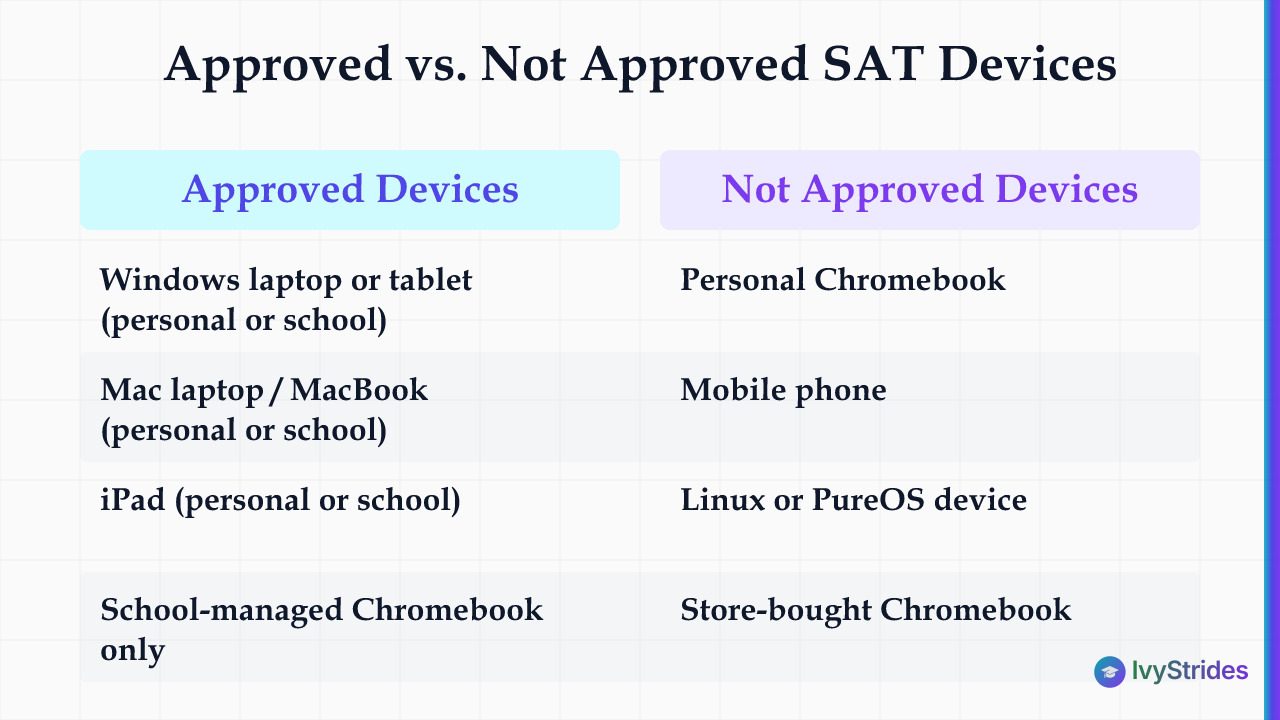
Four device types are approved for the digital SAT: Windows laptops and tablets, Mac laptops, iPads, and school-managed Chromebooks. Each must run Bluebook, College Board's testing application. Bluebook is the exam itself: the questions, the timer, and the built-in tools all live inside it.
The digital SAT runs 98 questions across two sections, and you take all of them inside Bluebook across 2 hours and 14 minutes of testing time, plus a 10-minute break. Your device has to run Bluebook from check-in to answer submission, so College Board expects it to stay on for roughly 3 hours.
The exam is adaptive by module: it sends you to an easier or harder second module based on how you do on the first, and the way those modules feed your 400 to 1600 score all plays out inside the same app your device must run cleanly.
The Chromebook split. This is where families get caught. A personal Chromebook you bought at a store is not approved. Only a school-managed Chromebook qualifies, because Bluebook is available only on Chromebooks your school manages through the Admin console in Google Workspace, with verified mode enabled. The hardware can look identical. The management is what matters.
| Device Type | Approved? | Personal or School-Managed |
| Windows laptop or tablet | Yes | Either |
| Mac laptop (MacBook) | Yes | Either |
| iPad | Yes | Either |
| School-managed Chromebook | Yes | School-managed only |
| Personal Chromebook | No | Not supported |
| Mobile phone | No | Not a testing device |
| Linux or PureOS device | No | Not supported |
What Are the Device Requirements for Taking the Digital SAT?
An approved device for the digital SAT must meet College Board's minimum operating system, have free space for Bluebook, hold a charge for the whole test, and connect to your test center's Wi-Fi. College Board raised the minimum versions for the 2026-27 school year and says it won't introduce major changes during the school year unless it must. Laptop screens must be at least 10 inches and tablet screens at least 8 inches.
That Chromebook rule is why a device can look fine and still fail: on a Chromebook, Bluebook runs in kiosk mode with verified mode, a school setting College Board says enhances test security.
| Device | Minimum OS (2026-27) | Free Space | External Keyboard |
| Windows laptop | Windows 11 24H2; no S mode or Windows 11 SE | 1 GB | Not permitted |
| Windows tablet | Windows 11 24H2; no S mode or Windows 11 SE | 1 GB | Strongly recommended |
| Mac laptop | macOS 15 | 1 GB | Not permitted |
| iPad | iPadOS 18 | 250 MB | Permitted |
| School-managed Chromebook | ChromeOS 144; ChromeOS Flex not supported | 1 GB | Not permitted |
For Macs and iPads, College Board advises against upgrading the operating system until after the test.
Charge is a test-day requirement, not a suggestion. College Board sets a minimum battery life of 3 hours for SAT Suite tests. You may bring a power cord or portable charger, but College Board says there is no guarantee you will have access to an outlet. Your fully charged device, with Bluebook installed and exam setup completed, sits first on College Board's list of what to bring on SAT test day, ahead of your admission ticket and an acceptable photo ID.
What to Do If You Do Not Have an Approved Device for the Digital SAT
If you do not own an approved device, borrow one from your school, a family member or a friend first, and request a College Board loaner only if that fails. College Board's SAT dates and deadlines say a loaner request must come at least 30 days before test day, earlier than the registration deadline. A request does not guarantee a device, and test centers cannot give you one on test day unless your request was approved.
Check that rule against the weekend dates still open for registration. December 5, 2026 is fewer than 30 days away, so it is too late to request a College Board device for it; you can still register for it with your own approved device or one borrowed from your school. The next date with time left for a loaner request is March 6, 2027.
| SAT Weekend Date | Registration Deadline | College Board Device Request |
| December 5, 2026 | November 20, 2026 | Closed: fewer than 30 days away |
| March 6, 2027 | February 19, 2027 | At least 30 days ahead |
| May 1, 2027 | April 16, 2027 | At least 30 days ahead |
| June 5, 2027 | May 21, 2027 | At least 30 days ahead |
Steps to Borrow a Device From College Board
-
Ask your school, a family member or a friend for an approved device first, so you can install Bluebook and practice on it.
-
If no one can lend one, register for a date at least 30 days away and, when asked about your device, select "I don't know if I have access to the necessary device."
-
At least 30 days before test day, select Request a device in My SAT; an adult who isn't a family member, such as a teacher or counselor, verifies your eligibility.
-
Avoid changing test centers within 30 days of the test, since the loaner may not reach the new center.
Get your Daily IV Dose on Instagram: quick study tips and test-day advice for high school students. Follow @ivy.strides.
- If approved, follow College Board's loaner steps: arrive 30 minutes before standard check-in, pick up the device, sign in, complete exam setup and get an admission ticket.
A loaner is typically a managed Chromebook in new or like-new condition, and College Board says its comparability studies show no difference in scores based on the type or age of device used. You receive it only on test day, so practice in Bluebook on any device you can reach, such as a school computer lab or a public computer.
If the loaner timeline moves you to March 6, 2027, IvyStrides' live online SAT classes meet twice a week in small groups and use Bluebook-style adaptive practice tests, and its SAT Winter Batch runs from November 28, 2026 to that March 6 test.
How to Prepare Your Device Before Digital SAT Test Day

Photo by Kaboompics.com on Pexels
Prepare your digital SAT device by installing Bluebook, running Test Your Device, completing exam setup, and charging the battery on test day morning. College Board says to download Bluebook at least 30 days before test day, so there is time to practice, switch devices if yours fails the requirements, or get help at school.
On a school-managed device, your school may install Bluebook for you, but checking that it did is your job. Clicking Test Your Device in Bluebook checks the operating system, memory and free space and flags some settings that block testing. College Board's checklist for a personal device also asks you to turn off parental controls, content filters, VPNs and startup apps such as writing assistants.
Pre-Test Device Checklist for the Digital SAT
-
At least 30 days out: download Bluebook, click Test Your Device and fix anything it flags.
-
Same window: practice in Bluebook on that device and test it on Wi-Fi away from home and school.
-
Between 1 and 5 days before: complete exam setup, which downloads your test and generates your admission ticket; print it or email it to yourself.
-
Test day morning: close and reopen Bluebook, click Test Your Device, check for messages and charge the battery.
-
Pack a power cord or portable charger; an outlet is not guaranteed.
A full-length Bluebook practice test is timed like the real one, so a complete sitting on your testing device shows whether it runs smoothly start to finish. Read that first result with care, because Bluebook practice scores can swing from one test to the next.
Inside Bluebook on the Math section, you will meet the built-in Desmos graphing calculator. Settle when Desmos helps and when it slows you down on SAT Math before test day, not during it.
If your device crashes or freezes mid-test, tell your proctor. College Board's fixes run in order: exit and reopen Bluebook, restart the device, and only then swap devices; the timer pauses for a limited time when you exit Bluebook, and your answers are saved to your device. Test centers may, but are not required to, offer a replacement, and a backup testing device is on College Board's list of items you may bring. Test Your Device lowers the risk without erasing it, because a few rare settings that block testing can't be checked before test day.
FAQ: Digital SAT Device Rules
What devices can I take the SAT on?
You can take the digital SAT on a Windows laptop or tablet, a Mac laptop, an iPad, or a school-managed Chromebook, all running the Bluebook app. Personal Chromebooks and mobile phones cannot run Bluebook, so they cannot be used.
What are the device requirements for taking the digital SAT?
Your device must run at least Windows 11 24H2, macOS 15, iPadOS 18 or ChromeOS 144, have free space for Bluebook, connect to the test center's Wi-Fi, and arrive fully charged. Bring a charger too, though you might not have access to an outlet.
What devices are approved for Bluebook?
Bluebook runs on Windows and Mac devices, iPads on iPadOS 18 or later, and school-managed Chromebooks. Personal Chromebooks are excluded because Bluebook is available only on Chromebooks a school manages through the Google Workspace Admin console, with verified mode enabled.
Can I show my SAT admission ticket on my phone?
Yes. College Board's testing rules say you must bring your electronic or printed admission ticket and show it at check-in, and its bring list says a printed ticket is preferred. Staff then collect and hold phones or have you place them in a backpack away from your desk, including during breaks, and you cannot test on a phone.
Your Next Step on Digital SAT Devices
The device question has one honest answer: confirm it early, because you cannot fix a wrong device on test day.
- Check your device against College Board's approved list and minimum operating systems.
- No approved device? Ask your school, family or friends, or request a College Board loaner at least 30 days before your date.
- Download Bluebook at least 30 days out and click Test Your Device.
- Complete exam setup 1 to 5 days before, and charge the device on test day morning.
Daily SAT and ACT prep on YouTube: short strategy videos from IvyStrides. Subscribe to IvyStrides on YouTube.

Rajesh is a technology leader, entrepreneur, and angel investor with 28+ years in Business & Technology Leadership and Product & Solution Engineering. He is passionate about education, mentoring, and driving digital transformation.