
SAT Mistake Tracker: The Error-Log Method Behind Real 100+ Point Score Jumps

On this page
- Why Your Score Stays Flat Even When You Keep Practicing (The Missing Layer)
- Step 1: Take a Full-Length Timed Practice Test and Record Every Wrong Answer
- What to Put in Each Row of Your SAT Error Log (The 7-Column System)
- How to Read Your Error Log for Patterns (Not Just Wrong Answers)
- How Many Practice Tests Do You Need Before Your Error Log Has Enough Data to Act On
- How a Section-Specialist Coach Reads an Error Log Differently Than You Do
- Free SAT Mistake Tracker Template: Build It in Google Sheets in 10 Minutes
- Turning Your Error Log Into a Score: The 8-Week Improvement Cycle
- FAQ
- What is the best format for an SAT error log: Google Sheets, Excel, Notion, or paper?
- Can you see exactly what you got wrong on the SAT after the real test?
- How many columns does an SAT mistake tracker actually need to be useful?
- What is the difference between a careless error and a conceptual gap on the SAT, and why does it matter for my log?
- How do I know when I have fixed a gap and can stop drilling it?
- Should I track both SAT Reading and Writing and Math errors in the same spreadsheet?
An SAT mistake tracker is a structured log, typically a Google Sheets or Excel spreadsheet, where you record every wrong answer from a practice test along with the question type, skill domain, module number, and the specific reason you missed it. Students who use one consistently and review it weekly typically identify two to four recurring error patterns within three to four full-length tests. Fixing those patterns, rather than re-doing random practice, is what drives 100+ point score improvements. This guide shows you how to build and use one, column by column.
Format and scoring claims in this article are anchored to current Digital SAT documentation from College Board, accurate for the 2025-2026 testing year. The seven-column structure, weekly review ritual, and eight-week cycle that follow are the coaching framework we use with students between practice tests.
Why Your Score Stays Flat Even When You Keep Practicing (The Missing Layer)
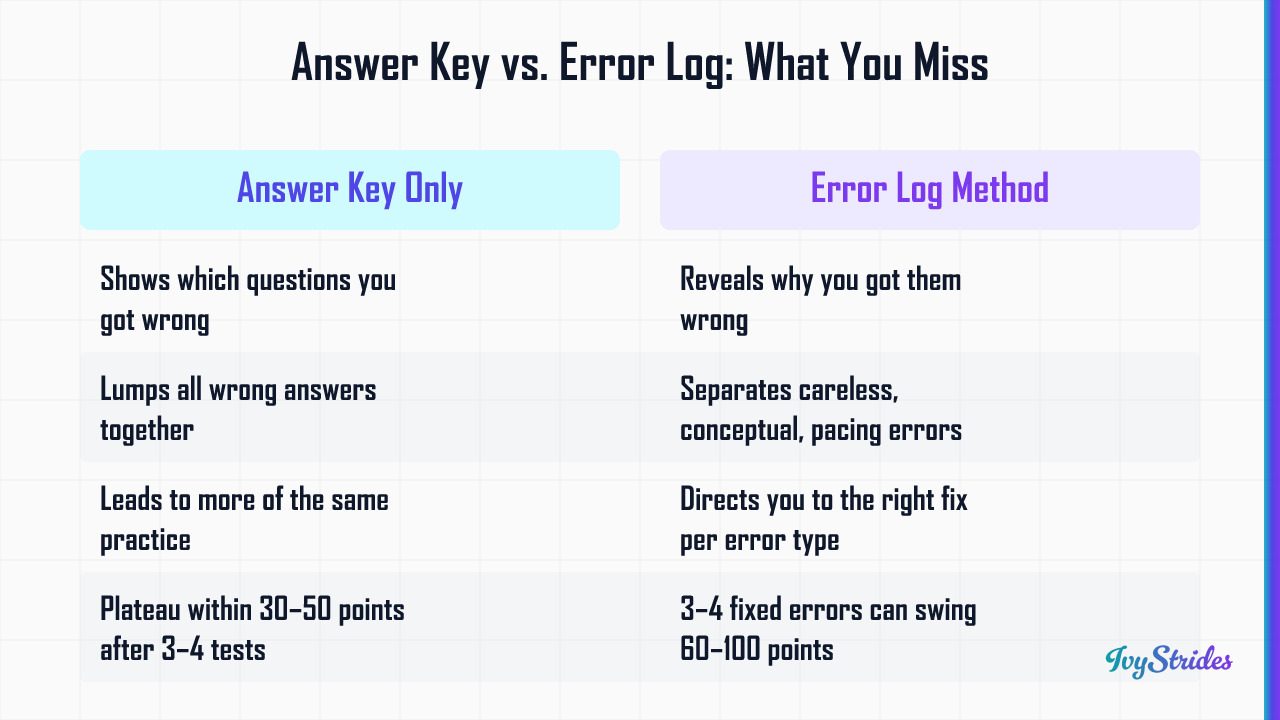
Reviewing the answer key tells you which questions you got wrong. It doesn't tell you why. And without the why, you can take five more practice tests and miss the same questions on every one.
In our coaching, students who review answer keys without an error log typically plateau within 30 to 50 points of their starting score after three or four practice tests. The score moves a little, then stops. They take another test, score the same, and assume they need more practice. They don't. They need different practice.
Three different things look identical on a scored answer key but require completely different fixes:
- A careless error is one where you knew the rule but bubbled the wrong letter, misread a negative sign, or skimmed past a "NOT" in the question stem.
- A conceptual gap is one where you didn't know the rule, or couldn't apply it under timed pressure.
- A pacing error is one where you rushed the last six questions because you spent too long on a single passage.
Same wrong answer on the score report. Three different remedies. A pacing error responds to a timing drill, not content review. A conceptual gap responds to targeted skill work, not "try to be more careful." If your log lumps them together, you'll apply the wrong fix and the error will keep showing up.
Here's the part most students miss. Stagnation looks different at each score band. A student at 1100 who misses eight Reading and Writing questions is often losing six of those eight to a single skill domain, usually Standard English Conventions (Boundaries) or Command of Evidence. A student at 1200 who can't break 1250 has typically closed the easy errors but is still missing three to four Module 2 Math questions in Advanced Math (quadratics and functions). A student at 1300 plateaued at 1320 is usually fighting a pacing problem in R&W Module 2, not a knowledge problem.
The Digital SAT has 54 Reading and Writing questions and 44 Math questions across two modules per section per College Board's Digital SAT documentation. With that few questions, in our coaching three or four eliminated errors per section typically translates to a 60 to 100 point swing. That's the use the log gives you.
For a fuller treatment of plateau diagnosis on the Reading side, see our breakdown of why is my sat score not improving. For the broader prep context, the official sat study guide 2026 lays out how the mistake tracker fits into a complete prep arc.
Step 1: Take a Full-Length Timed Practice Test and Record Every Wrong Answer

Photo by Andy Barbour on Pexels
The error log starts with one thing: a real, full-length, timed Digital SAT practice test. Not a question bank. Not 20 random problems from a workbook. A complete test.
Before a student can build a meaningful error log, they need a baseline diagnostic score. A timed, full-length practice test from the IvyStrides Test Pack library gives that baseline and simultaneously produces the first batch of log entries to analyze. Untimed practice produces inflated scores and disguises pacing errors, which is one of the three root causes you most need to see.
Here's the format you're testing under, per College Board. The Digital SAT has two Reading and Writing modules of 27 questions each, 32 minutes each. Then two Math modules of 22 questions each, 35 minutes each. Module 1 difficulty is fixed for everyone. Module 2 difficulty adapts based on how you performed in Module 1. A student who misses roughly 8 to 10 questions in R&W Module 1 gets routed to the easier Module 2, which caps the achievable section score. That's why Module 1 errors carry an outsized cost, and why your log must track which module each error came from.
A common question: can you see what you got wrong on the SAT? For the school-day SAT, College Board provides a question-level score report through the student portal at satsuite.collegeboard.org, though detail varies by administration. For weekend SAT dates, the Question and Answer Service (QAS) is available for select sittings. For practice tests, the answer key and your own log are how you get that visibility. Logging on practice tests prepares you to read the real score report when it arrives.
For the practice-test source itself, we use our Official SAT practice tests, built to mirror the College Board format, including the Module 1 to Module 2 adaptive routing. If you're wondering whether Module 1 performance really locks in your ceiling, our deep-dive on does digital sat module 1 lock in your score ceiling walks through the math.
After the test: open a blank spreadsheet, set up the seven columns described below, and enter every missed question. Yes, every one. Even the ones where you "knew it and just bubbled wrong." Those are the most important entries in your log.
What to Put in Each Row of Your SAT Error Log (The 7-Column System)
Three columns is too few. Twelve columns means you'll fill it out twice and abandon it. Seven is the working number.
Column 1: Test source and question number. Example: "IvyStrides Test Pack #2, Q14." You need to be able to find the question again later.
Column 2: Section and module. R&W Module 1, R&W Module 2, Math Module 1, or Math Module 2. This column matters more than students think. Because the Digital SAT's Module 2 difficulty is determined by your Module 1 performance, errors in Module 1 carry a compounding cost that a flat error count won't reveal; your log must tag the module number so you can weight Module 1 mistakes appropriately. A Module 1 Math miss is worth roughly 1.5x a Module 2 Math miss in score impact.
Column 3: Skill domain or question type. Use the College Board domain names, not your own labels. For Reading and Writing: Information and Ideas (Command of Evidence, Central Ideas), Craft and Structure (Words in Context, Text Structure and Purpose, Cross-Text Connections), Expression of Ideas (Rhetorical Synthesis, Transitions), and Standard English Conventions (Boundaries, Form/Structure/Sense). For Math: Algebra, Advanced Math, Problem-Solving and Data Analysis, and Geometry and Trigonometry. These are the official domain buckets (College Board, satsuite.collegeboard.org).
Column 4: Your answer and the correct answer. Just the letters. "B / C." Quick to enter, easy to scan when reviewing.
Column 5: Root-cause error category. Pick one: careless, conceptual gap, pacing, or misread prompt. This is the column students skip and the column that matters most. Force yourself to label each error. If you can't decide between careless and conceptual gap, ask: "If I had unlimited time and zero pressure, would I have gotten this right?" Yes = careless or misread. No = conceptual gap.
Column 6: One-sentence explanation of the correct reasoning. Not a paragraph. One sentence. "Vertex form reveals the minimum at x = 3, not the y-intercept." Writing it forces you to actually understand the fix.
Column 7: Review status and scheduled retest date. Use a simple system: Red (unreviewed), Yellow (drilled, not retested), Green (confirmed fixed on a later full-length).
Here's a real example row from a student's log: Test 4, Q18, R&W Module 2, Craft and Structure (Words in Context), answered B, correct C, root cause: misread the tone of the surrounding sentence, not a vocabulary gap, retest scheduled 7 days out. That row tells you something useful. The student doesn't need vocab flashcards. They need to slow down on tone-context cues. Completely different drill.
If you're searching for "sat mistake tracker excel" or "sat error log template excel," Google Sheets works identically and is free. Use whichever you'll actually open. For the scoring mechanics behind why the module column matters, see how the digital sat is scored. For the full skill-domain breakdown on the math side, sat math topics maps every domain to typical question types.
How to Read Your Error Log for Patterns (Not Just Wrong Answers)
A log with 30 entries and no analysis is just guilt in spreadsheet form. The point isn't the entries. It's the patterns.
The weekly review ritual is 30 minutes, once a week, on the same day. Sit down with the log and sort it three ways.
First, sort by skill domain. Which domain has the most entries? If you have 11 R&W errors and seven are in Standard English Conventions, you have a Conventions problem, not a "reading" problem. In our coaching, most students typically discover that two or three skill domains account for roughly 60 to 70 percent of their missed points. That's the 80/20 of SAT prep.
Second, sort by root-cause type. Filter for "careless" only. How many of your errors are mechanical? If a third of your misses are careless, you don't need more content. You need a pre-submission check habit and a slower pace through Module 1. Then filter for "pacing." If you have zero pacing errors but a lot of conceptual gaps, your pacing is fine and content review is the priority. The reverse is also common: students at 1300+ often have almost no conceptual gaps left, but lose four to five Module 2 questions purely to time pressure.
Third, sort by module. Are your Module 1 errors clustered or spread out? Module 1 errors are where score ceilings are built or broken.
On the 400-1600 scale, moving from the 60th to the 75th percentile (roughly 1060 to 1200) typically requires eliminating two to three recurring error patterns, which is exactly what a well-maintained error log is designed to surface. A score of 1200 is approximately the 74th percentile; 1350 is approximately the 91st percentile (College Board score percentile tables, satsuite.collegeboard.org).
In our coaching with students in the 1100 to 1250 band, Standard English Conventions (Boundaries sub-skill) and Command of Evidence (Textual) are the two most frequently logged error domains in R&W. In the 1250 to 1400 band, Advanced Math (quadratics and functions) and Problem-Solving and Data Analysis (two-variable statistics) are the most common Math error clusters. These patterns hold across hundreds of student logs.
So what do you do with the pattern? Build a 30-minute targeted drill session for the next day. If Standard English Conventions (Boundaries) is your top error category with six entries, you spend 30 minutes doing 15 Boundaries questions only. No mixed practice. No full passage sets. Just the skill. Then you log the drill results too.
A "sat wrong answer tracker" is only valuable if the weekly review session converts patterns into drills. Without the review, the log is data. With the review, it's a plan. For percentile context as you set targets, our sat percentiles page maps every score to its percentile. For domain-specific strategy on the highest-use R&W cluster, see how to attack the information and ideas domain on the digital sat.
How Many Practice Tests Do You Need Before Your Error Log Has Enough Data to Act On
Short answer: two to three full-length tests minimum before the patterns are reliable. One test gives you suggestive data. Two tests show whether the pattern repeats. Three tests confirm it.
The error log only works if it's fed by real, full-length Digital SAT practice tests taken under timed conditions; our IvyStrides Test Packs are built for this cadence, giving students official-format full-lengths they can score, log, and retest against on a structured schedule. One full-length per session, scored honestly, logged completely, reviewed weekly.
Here's the retesting trigger we use in coaching: when a skill domain accumulates five or more logged errors across your tests, it's ready for targeted drill. Below five, you can't be sure it's a pattern versus noise. At five or more, it's a pattern. Drill it.
The spaced-retest sequence:
-
Full-length test. Log all errors.
-
Identify top two skill domains by error frequency.
-
Targeted drill on those two domains for one to two weeks.
-
Next full-length test. Did the error rate in those domains drop?
-
If yes, mark those rows green and move to the next-highest domain.
-
If no, the drill wasn't deep enough or the root cause was misidentified. Re-examine.
In our coaching, students who complete three or more full-length timed practice tests and maintain an error log between each test show measurably more consistent score gains than students who do question banks alone. Question banks are useful as drill material after the log has told you what to drill, not as a substitute for the diagnostic process.
A reasonable cadence for a three-month prep window is one full-length every two to three weeks, a weekly 30-minute log review, and targeted drill sessions in between. That's roughly six full-lengths over twelve weeks, which gives you enough data to identify and close four to six error patterns. For score interpretation between tests: a score change of less than 30 points is statistical noise on the Digital SAT; 50+ points is real movement.
If you're searching for "sat spreadsheet," the most useful framing is this: the log is a living spreadsheet updated after every test, not a one-time document. For a more complete weekly structure, our sat study plan shows how the testing cadence fits into a full prep schedule. If you're wondering how the retest cycle interacts with real test dates, how many times can you take the sat covers the logistics.
How a Section-Specialist Coach Reads an Error Log Differently Than You Do
A student looking at her own log sees individual errors. A coach who has read hundreds of student logs sees clusters. Same data, different signal.
A junior we worked with last fall labeled all 11 of her missed R&W questions as "reading comprehension." To her, it was one problem. Her R&W coach reading the same log immediately separated those 11 entries into three buckets: four Command of Evidence misses (a textual-anchoring sub-skill), three Words in Context misses (a tone-and-register sub-skill), and four Text Structure misses (a passage-architecture sub-skill). Three different problems. Three different drill plans. The "reading comprehension" label was hiding all of it. After two weeks of targeted drill, her R&W score rose 40 points on the next full-length.
On the Math side, a specialist will separate "set up the equation wrong" from "solved the equation wrong." The first is a word-problem translation gap (conceptual). The second is an algebra procedural error (often careless). They look identical on the score report. They require completely different remedies. Translation gaps respond to a problem-modeling drill where you write the equation but don't solve it. Procedural errors respond to slow-and-check drills with explicit step-by-step annotation. Mix them up and neither gets fixed.
IvyStrides uses section-specialist coaches, not generalist tutors. One coach for SAT Reading and Writing. A separate coach for SAT Math. The reason is exactly this: pattern recognition within a single section, across hundreds of student logs, is the skill that turns log entries into the right drill plan. A coach who teaches both R&W and Math at a generalist level can't build that depth of pattern library in either.
When is self-directed logging enough? In our coaching, students typically self-coach successfully when they're within roughly 80 to 100 points of their target and their log is showing clear patterns they can name. When does a specialist add real value? When the gap is 150+ points, when the patterns aren't clear after three tests, or when you've drilled a domain and the error rate isn't dropping. That last one is the strongest signal: if you're drilling correctly and the next full-length still shows the same misses, the root cause was misidentified, and that's where outside eyes earn their fee.
For students ready to bring a coach into the loop, our 1-on-1 SAT prep program pairs you with a section specialist who reads your log between sessions. For Math-specific help, our Online SAT Math tutor page shows how a Math-only specialist works.
Free SAT Mistake Tracker Template: Build It in Google Sheets in 10 Minutes
You don't need a paid tool. You need ten minutes and Google Sheets.
Open a blank sheet. Row 1 is your headers. Type these seven column names in cells A1 through G1:
| Test Source | Section + Module | Skill Domain | Your Answer | Correct Answer | Root Cause | Retest Status |
That's the template.
One sample completed row so you can see the format in practice:
| IvyStrides Test Pack #2 | Math Module 1 | Advanced Math (Quadratics) | A | C | Conceptual gap: did not recognize vertex form | Drilled 2x, retest scheduled |
A few setup tips that make the log dramatically more useful:
- Freeze Row 1 (View > Freeze > 1 row) so headers stay visible as you scroll.
- Add data validation to the Section + Module column (Data > Data validation > Dropdown) with four options: R&W Module 1, R&W Module 2, Math Module 1, Math Module 2. Prevents typos that break sorting.
- Add data validation to the Root Cause column with four options: Careless, Conceptual Gap, Pacing, Misread Prompt.
- Color-code the Retest Status column: red for unreviewed, yellow for drilled but not retested, green for confirmed fixed on a later full-length. Visual scanning matters when you have 40+ entries.
- Share the sheet with your parent or tutor (top-right Share button). Accountability triples the chance you'll keep it updated.
Google Sheets is free, shareable, and works on any device. If you prefer Excel, the same seven columns work identically. For students searching "sat mistake tracker free" or "sat error log template excel," the answer is the same: build it in 10 minutes with the headers above. The tool isn't what matters. The discipline of filling it in after every test is.
Turning Your Error Log Into a Score: The 8-Week Improvement Cycle
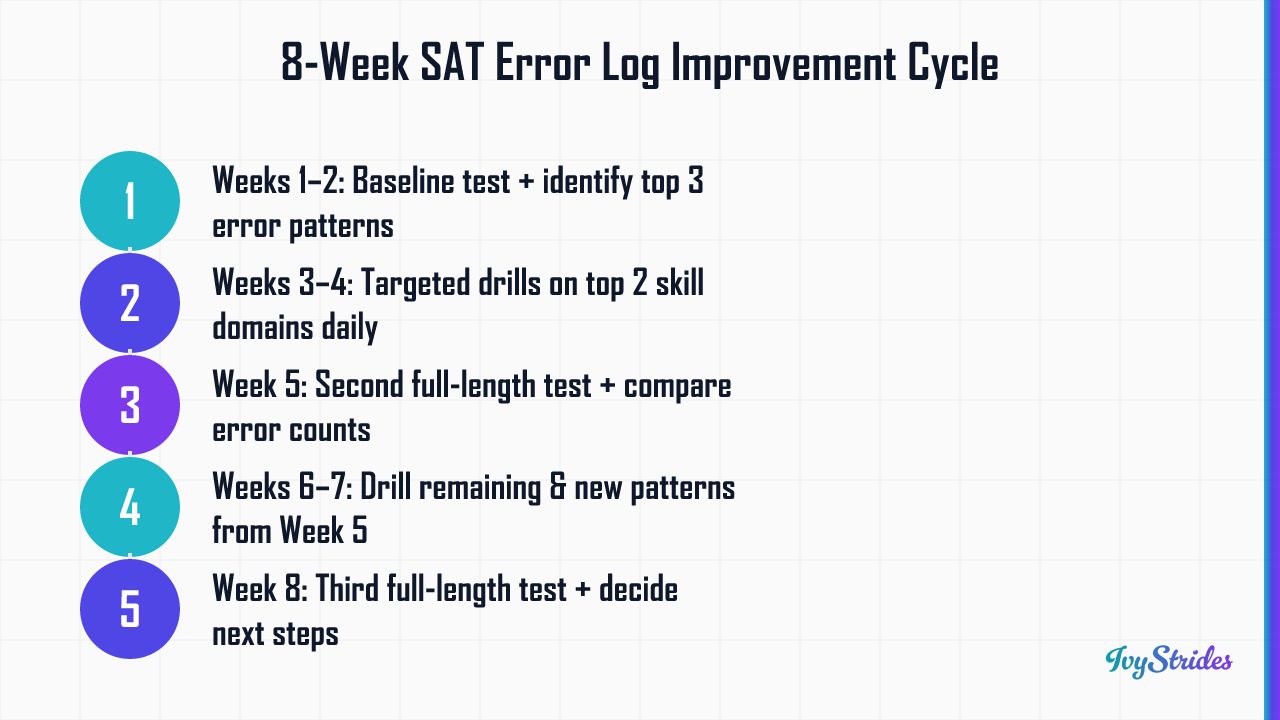
Here's how the log fits into a realistic eight-week prep window. This is the cycle we run with students who have a test date approximately two months out.
Weeks 1-2: Baseline and pattern identification. Take a full-length timed Digital SAT practice test on Day 1. Log every error using the seven-column system. Spend Week 2 reviewing the log, sorting by skill domain and root cause, and identifying your top three error patterns. No drilling yet. Just diagnosis.
Weeks 3-4: Targeted drill on top two patterns. Pick the two highest-frequency skill domains. Run 30-minute drill sessions four to five times per week, alternating between the two domains. No full-length test this fortnight. The goal is depth on a narrow target.
Week 5: Second full-length test. Same conditions as the baseline. Score it. Log new errors. Compare: did the error count in your two drilled domains drop? If yes, you've confirmed the fix. If no, the root cause was probably misidentified and needs a second look.
Weeks 6-7: Address remaining patterns plus any new ones surfaced in the Week 5 test. Same drill structure. By now your log has roughly 60 to 90 entries and the patterns are well-defined.
Week 8: Third full-length test. Compare to baseline. Decide whether you need a fourth cycle before test day or whether you're at target.
Honest framing on score improvement timelines, because students ask two specific versions of this question constantly.
"Is it possible to raise my SAT score from 1030 to 1400?" That's a 370-point gain. It's at the high end of what's achievable. In our coaching, students starting at 1030 who complete a full diagnostic-driven program over four to six months with a section specialist typically reach 1200 to 1300. Getting to 1400 is possible, but it usually requires a longer timeline (six months plus) and sustained weekly effort. Anyone who tells you 370 points in eight weeks is selling something.
"How much can I improve my SAT score (1100 now) in 2 months?" For students at the 1100 band completing three full-length tests with error-log review and targeted drilling over eight weeks, 80 to 130 point gains are typical. For students completing the full IvyStrides 1-on-1 SAT program over a longer arc, 200+ point gains are typical. Eight weeks is enough for the first major jump. It's usually not enough for the second.
Two more caveats worth surfacing. Test-optional admissions policies vary by school and year (FairTest), but a strong SAT score still strengthens an application at the vast majority of selective schools, including most test-optional ones. And admissions outcomes depend on the full application: essays, GPA, course rigor, extracurriculars. Score gains help. They don't substitute for the rest.
To plan your eight-week cycle around an actual test date, check sat test dates 2026. For the broader prep context the cycle fits into, sat study guide pdf covers the full arc.
FAQ
What is the best format for an SAT error log: Google Sheets, Excel, Notion, or paper?
Google Sheets is the most practical choice for most students. It's free, accessible from any device, shareable with a tutor or parent, and easy to sort and filter by skill domain or root-cause type. Excel works identically if you already have it. Notion templates add visual structure but can slow down the logging process if you're entering data right after a test. Paper notebooks work for students who prefer analog review but make pattern-sorting much harder. The format matters less than the consistency of use; pick the one you'll actually update after every practice test.
Can you see exactly what you got wrong on the SAT after the real test?
For the school-day SAT and PSAT, College Board provides a score report with question-level detail through the student portal at satsuite.collegeboard.org, though the level of detail varies by administration. For weekend SAT administrations, College Board offers the Question and Answer Service (QAS) for select test dates, which provides your answers alongside the correct answers and question difficulty. For practice tests, the answer key and your own error log serve this function. Logging errors on practice tests prepares you to use the official score report effectively when it arrives.
How many columns does an SAT mistake tracker actually need to be useful?
Seven columns cover everything a student needs without making the log so complex that it never gets filled in: test source and question number, section and module, skill domain or question type, your answer vs. the correct answer, root-cause error category, a one-sentence explanation of the correct reasoning, and review and retest status. Fewer than five columns and you lose the pattern-detection power. More than eight and the log becomes a chore. The root-cause column is the one most students skip and the one that matters most.
What is the difference between a careless error and a conceptual gap on the SAT, and why does it matter for my log?
A careless error is one where you know the rule or concept but made a mechanical mistake: misread a negative sign, skipped a word in the question stem, or bubbled the wrong answer. A conceptual gap is one where you didn't know the underlying rule or couldn't apply it under pressure. These require completely different fixes: careless errors respond to pacing adjustments and a pre-submission check habit; conceptual gaps require targeted content review and repeated practice on that specific skill. Labeling them the same way in your log means you'll apply the wrong remedy and the error will keep appearing.
How do I know when I have fixed a gap and can stop drilling it?
A gap is provisionally closed when you answer three to five questions of the same skill type correctly in a targeted drill session. It's confirmed closed when the next full-length practice test shows zero or one error in that skill domain, compared to three or more errors before the drill. Update the retest status column in your log to "confirmed" only after the full-length retest confirms the improvement. In our coaching, students sometimes close a gap in drills but revert under timed full-length conditions, which is why the full-length retest is the final confirmation step, not the drill.
Should I track both SAT Reading and Writing and Math errors in the same spreadsheet?
Yes, one spreadsheet with a filter or tab for each section is the most efficient setup. Using a single sheet with a "Section" column lets you sort by section when you want to focus on R&W or Math separately, and lets you see your overall error volume across both sections when you want a full picture. Some students prefer two tabs (one for R&W, one for Math) for visual clarity. Either approach works as long as the skill domain and root-cause columns are consistent across both sections.
Build the spreadsheet today. Take the next full-length this week. Log every error using the seven columns. Then run the weekly review. The data is already in your wrong answers; the log is just what turns it into the specific drills that move your score.

Award-winning author (South Asian Book Award) and graduate of BITS Pilani and UCLA Luskin School of Public Affairs. Brings a published writer's eye to Common App essays and grammatical precision to SAT and ACT R&W instruction.